Hey guys, thanks for stopping by! If you’re here, you’re probably dealing with carton printing machinery—whether you’re a new shop owner getting your first press or someone looking to move a setup to a new facility, you know how tricky transporting these big, heavy pieces can be. I’ve been selling and supporting carton printing machinery for years now, and let me tell you, I’ve seen my share of botched moves: machines scratched beyond repair, alignment messed up so bad they could barely print straight boxes, and even a couple where someone tried to haul a flexo press on a regular flatbed and it almost tipped over. Today, I’m gonna break down exactly how to do this right—no fancy jargon, just real stuff I’ve learned working with buyers like you every single day. Carton Printing Machinery

First off, let’s get one thing straight: carton printing machinery isn’t a desk or a small printer you can toss in the back of a pickup. Most of the time, these machines weigh anywhere from 1,500 lbs for a small semi-automatic model up to 10,000+ lbs for a full automatic flexo printer with die-cutting attachments. Size matters too—even a “small” press might be 8 feet long, 5 feet tall, and 3 feet wide. So winging it here is a bad idea. I always tell new buyers to start with pre-planning before you even book a truck or touch a machine.
Step 1: Do your homework on the machine first. Wait—you probably already own it, right? But if you’re moving, pull out the original spec sheet (or shoot me a message and I can send you a basic one if you lost it). That sheet will have the exact weight, dimensions, and even the manufacturer’s notes on how to lift or move it safely. For example, some machines have designated lifting points—those big metal eye bolts built into the frame—skip those if they look rusted or bent, because they’re there for a reason. Other machines, like flatbed die-cutters, have fragile parts on the bed that can’t support the machine’s weight, so you can’t just sling a chain around the whole thing. I once had a buyer try that on a die-cutter and they bent the bed so bad they had to replace a $2,000 part. Don’t do that.
Next, measure your access points. Before you even pick a truck, walk the path from your machine’s current spot to the loading area, and then from the delivery truck to where it’s going. That means doorways, hallways, elevators if you’re on a upper floor, even the loading dock’s height. I had a buyer last month who booked a big flatbed, only to realize his shop’s loading door was 2 inches too short for the machine’s height. He had to rent a crane to lift it over the door—added $800 to his move. Measure twice, or even three times. If there’s a tight corner, mark it with tape and practice moving a similar-sized box or piece of furniture around it to make sure it fits. Also, check if the ground is level where you’re loading and unloading; if it’s sloped, you’ll need extra supports to keep the machine from sliding.
Step 2: Pick the right transportation. Let’s skip the “I’ll just rent a moving truck” thing—most standard moving trucks can’t handle that kind of weight. You need specialized equipment, and not just any driver. Here’s what I recommend: first, get a flatbed truck with a lift gate if possible. A lift gate is a game-changer for heavy machines—no straining, no risk of dropping it. But if you’re moving a super heavy model (over 5,000 lbs), you might need a semi-trailer with a lowboy. Lowboys are the ones that have a lower deck, which is good if your machine is tall and your delivery spot has low clearance. Also, make sure the driver you hire has experience with industrial machinery, specifically printing presses. Regular moving drivers might not know how to secure a press correctly—one time I heard of a driver who tied a press down with regular rope instead of heavy-duty straps, and the machine shifted 6 inches on the highway, breaking a roller. Bad move.
What about cost? I get it, budgets are tight. The size and distance will change it, but you’re looking at $300 to $1,000 for local moves (within 50 miles), and $1,000 to $3,000 for long-distance. But don’t just go for the cheapest quote. Ask the company if they have insurance that covers industrial machinery, and if they can show proof of experience with carton printing presses. If a quote is way lower than others, it’s probably because they’re using regular straps and don’t have the right equipment. You’ll regret it if your $50,000 machine gets damaged because you tried to save $100.
Step 3: Prep the machine for transport. This is where a lot of people cut corners, and it’s the part that prevents most damage. First, turn everything off and unplug it—obviously. Then, remove any loose parts. Those little ink trays, spare rollers, die-cutting blades, even the control panel cover? Take them off, box them up, label them clearly. Put a note on the box that says “SPARE PARTS FOR [MODEL #]” so no one loses them. If you don’t label them, when you go to set the machine back up, you’ll be digging through a pile of random stuff for hours.
Next, protect the fragile parts. Ink rollers are super easy to scratch, and the digital control screens on modern automatic presses can crack if they hit something. I always tell people to wrap the rollers in bubble wrap or moving blankets, and tape the screen with soft foam padding—no regular packing tape directly on the screen, that can leave sticky residue and even pull off the coating. Also, cover the entire machine with a heavy-duty moving blanket or a custom plastic wrap if you can. This keeps dust, dirt, and rain off it during transport. One buyer didn’t do this, and by the time the machine arrived, there was a layer of road grime all over the gears—took him a whole weekend to clean it.
Now, securing it. This is non-negotiable. You need heavy-duty steel chains or ratchet straps, not the thin ones you use for a lawnmower. Attach them to those designated lifting points I mentioned earlier, and make sure they’re tight. Test it—wiggle the machine as hard as you can; if it moves more than an inch, tighten the straps. Also, put wooden blocks under the base of the machine to keep it from sliding back and forth. For long moves, some people also tie a small nylon strap to the top of the machine and to the side of the truck to prevent it from tipping if the driver brakes hard. Trust me, I’ve seen a machine almost fall off a truck because it wasn’t secured right—never again.
Step 4: Loading and unloading the machine. This is the part where you don’t want to do it alone. Even if a machine is light (for the industrial stuff, that is), two people can’t safely lift it. You need a team—at least 4 strong people, plus a forklift or a crane if it’s over 3,000 lbs. Forklifts are great for loading onto a truck, but make sure the forks are the right length for the machine. They should go at least 2/3 under the machine’s base, not just the tips—otherwise, the machine could tip on the forks. If you don’t have access to a forklift, rent a small crane (like a 10-ton crane) with a spreader bar. Never use just a single hook— that can bend the frame.
When unloading, same rule applies. Take it slow, one step at a time. Don’t rush to get it done. If you’re loading onto a lift gate, lower it slowly to the ground. If you’re moving it into a shop, use a furniture dolly with heavy-duty wheels—regular dollies won’t hold the weight. Also, once it’s in place, don’t plug it in right away. Wait at least 24 hours if it was transported in cold weather, or if it was moved upside down (which it shouldn’t be, but sometimes happens). The internal parts need time to settle, otherwise you might fry a motor or a sensor.
Wait, what if you’re buying a used carton printing machine and it’s being shipped from another country? I get that’s a whole other ballgame. You’ll need to handle customs, so make sure the seller (that’s me, or someone like me) provides all the necessary paperwork: the machine’s serial number, original specs, and proof of ownership. Also, check the import rules in your country—some places have restrictions on used industrial machinery, so you don’t want it sitting in a port for weeks.
Now, common mistakes to avoid. Let me list these out so you don’t make them: 1. Don’t ignore the access points. I can’t stress this enough—measure doorways, hallways, even the width of the path outside. 2. Don’t use regular moving equipment. A pickup truck might work for a tiny semi-automatic, but anything bigger needs a specialized truck. 3. Don’t skip protecting fragile parts. That control screen or those ink rollers cost way more than the extra $20 for bubble wrap. 4. Don’t go cheap on insurance. Your machine is an investment—make sure it’s covered if something goes wrong.
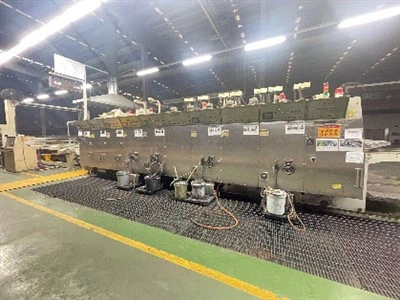
At the end of the day, transporting carton printing machinery is all about planning and being careful. If you take the time to prep the machine, pick the right transport, and take it slow when loading/unloading, you’ll avoid most of the headaches. If you’re in the market for a new machine (or even have questions about moving your existing one), shoot me a message. I’ve helped hundreds of buyers get their machines moved safely, and I can give you specific tips for your model, no generic advice. Just reach out, and we can chat through your setup, the move details, and whatever else you need to make it go smooth.
Corrugated Box Machinery References
- Industrial Machinery Transport Association. Best Practices for Moving Printing and Packaging Equipment. 2022
- Carton Machinery Supply & Maintenance Guide. Section on Site Preparation and Equipment Handling. 2021
- U.S. Department of Transportation. Guidelines for Heavy Industrial Equipment Transportation. 2020
- Local Fabrication & Equipment Movers Association. Small Business Guide to Industrial Machine Moves. 2023
Guangzhou HS Machinery Co., Ltd.
We’re well-known as one of the leading carton printing machinery manufacturers and suppliers in China. Please feel free to buy cheap carton printing machinery for sale here from our factory. Quality products and low price are available.
Address: Xiaowu 1st Industrial Area, Xiaowu Village, Dongchong Town, Nansha, Guangzhou, China
E-mail: vipmachinery@126.com
WebSite: https://www.cartonboxsolutions.com/
